Dashboard: Interactive Control (IC) Ops
Interactive Control Operations (IC Ops) are a powerful differentiating aspect of RapidFire AI that enable rapid experimentation capability for AI customization.
Motivation for IC Ops
IC Ops are control operations over the runs in flight in an ongoing experiment. They are motivated by an often under-appreciated pain point felt by many AI developers:
How accurate a given configuration will be is impossible to tell upfront in general. Experimentation is critical: one must try alternate configs based on their intuition about their specific use case, dataset, model, and eval metrics.
Not all configs are made equal. One must be able to easily try and retry values, zoom into promising regions of values, adjust on the fly, etc. This can help reach better eval metrics/model alignment more quickly. Otherwise, one might squander their (labeled) data and/or waste resources.
Even for a prior deployed model, one may need to adapt knobs over time as the data distribution evolves (e.g., concept drift), application schema evolves (e.g., data collection process changes), newer/better models emerge (e.g., smaller but more capable LLMs), etc.
Generic MLOps tools treat a run as a generic monolithic job and schedule them at a coarse granularity, leading to a disconnect between what is needed for customization and the execution layer. IC Ops alter this status quo by giving you a whole new level of control over runs in flight.
No need to juggle disparate tools for data-parallelism (DDP), model-parallelism (FSDP / DeepSpeed), or task-parallelism (W&B, Ray Tune, etc.). RapidFire AI’s execution engine handles lower level scheduling and orchestration of run adaptively to enable IC Ops.
Semantics of IC Ops
IC Ops can be used only while a run_fit() or a run_evals() is actively running.
For run_fit(), the IC Ops panel lives on the metrics dashboard: click on the “IC Ops”
column buttons in the runs table or on any run’s curve on any metrics plot in the “Chart” view.
Also see ML Metrics Dashboard.
For run_evals(), the panel appears in the notebook itself, as explained further below.
Alternatively, for run_fit() you can also invoke the in-notebook IC Ops control panel
with the following code.
As of this writing, this in-notebook panel works only on the Google
Colab deployment for run_fit(), but we will soon support it for other environments too.
# Create Interactive Controller
from rapidfireai.fit.utils.interactive_controller import InteractiveController

controller = InteractiveController(dispatcher_url="http://127.0.0.1:8851")
controller.display()
The in-notebook IC Ops controller has the same operations and it looks like the following:
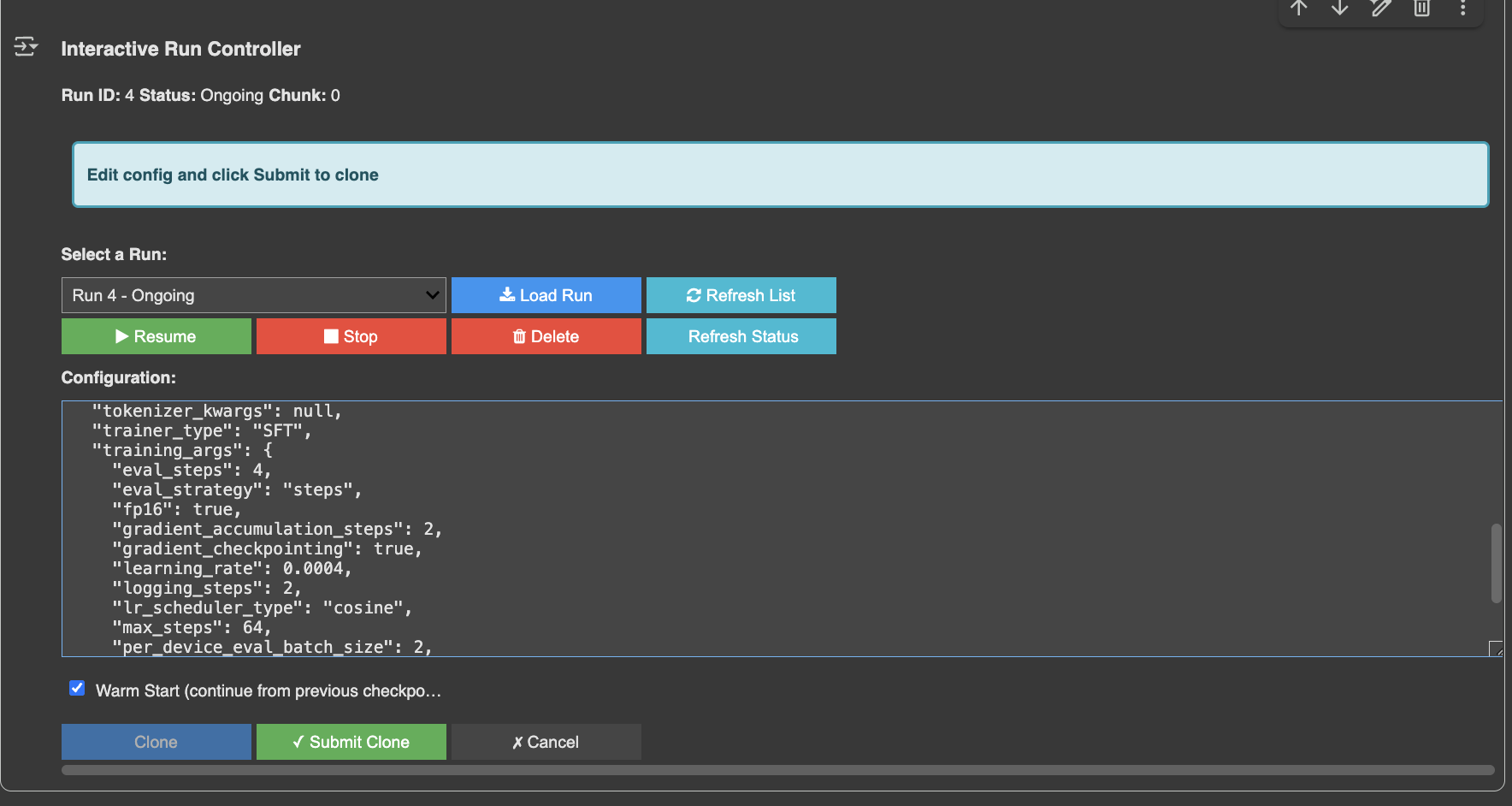
Note
This is an older capture: its header reads “Chunk: 0.” On current main the same field is
labeled with the shard the run is on.
For run_evals(), as of this writing, only jupyter is supported when its server is
started with the RapidFire AI CLI as below. We will expand support for other IDEs soon.
Note that IC Ops panel will appear below the cell where run_evals() is invoked.
rapidfireai jupyter
This starts a Jupyter server on port 8850 (override with RF_JUPYTER_PORT) already
configured with the cross-origin settings the in-notebook panel needs, and it prints the URL to
open along with the ports to forward.
Open that URL on your browser.
If you are running it on a remote machine, make sure to also forward
the ports on your client as explained here.
As of this writing, we support 4 IC Ops: Stop, Resume, Clone-Modify, and Delete. We explain each shortly below.
All IC Ops on a run are queued by the system and executed at a shard boundary for that run.
This avoids potentially non-deterministic or other inconsistent behaviors during concurrent run execution.
Note that different runs might reach their shard boundary at different points in time.
To control the number of shards, set num_shards during run_fit() or run_evals();
more details on the Experiment docs page.
IC ops can be invoked as intermittently as you want during a long-running run_fit().
So, you can launch, say, 16 configs in one go (even on a 4-GPU machine), check in after a few shards,
and stop bottom 80% of the runs. You can let the top performers continue for longer. Then you can
clone and modify some to add new finer grained runs and warm start their parameters. And so on.
Under the hood, RapidFire AI automatically adjusts the apportioning of the GPUs among all ongoing runs to ensure maximal GPU utilization.
Stop
This IC Op earmarks a run to be stopped at the end of its current shard. It will still be alive but it will not use any GPU resources from the next shard. You will still see its minibatch-level plots advancing for the current shard. You cannot stop an already stopped or deleted run.
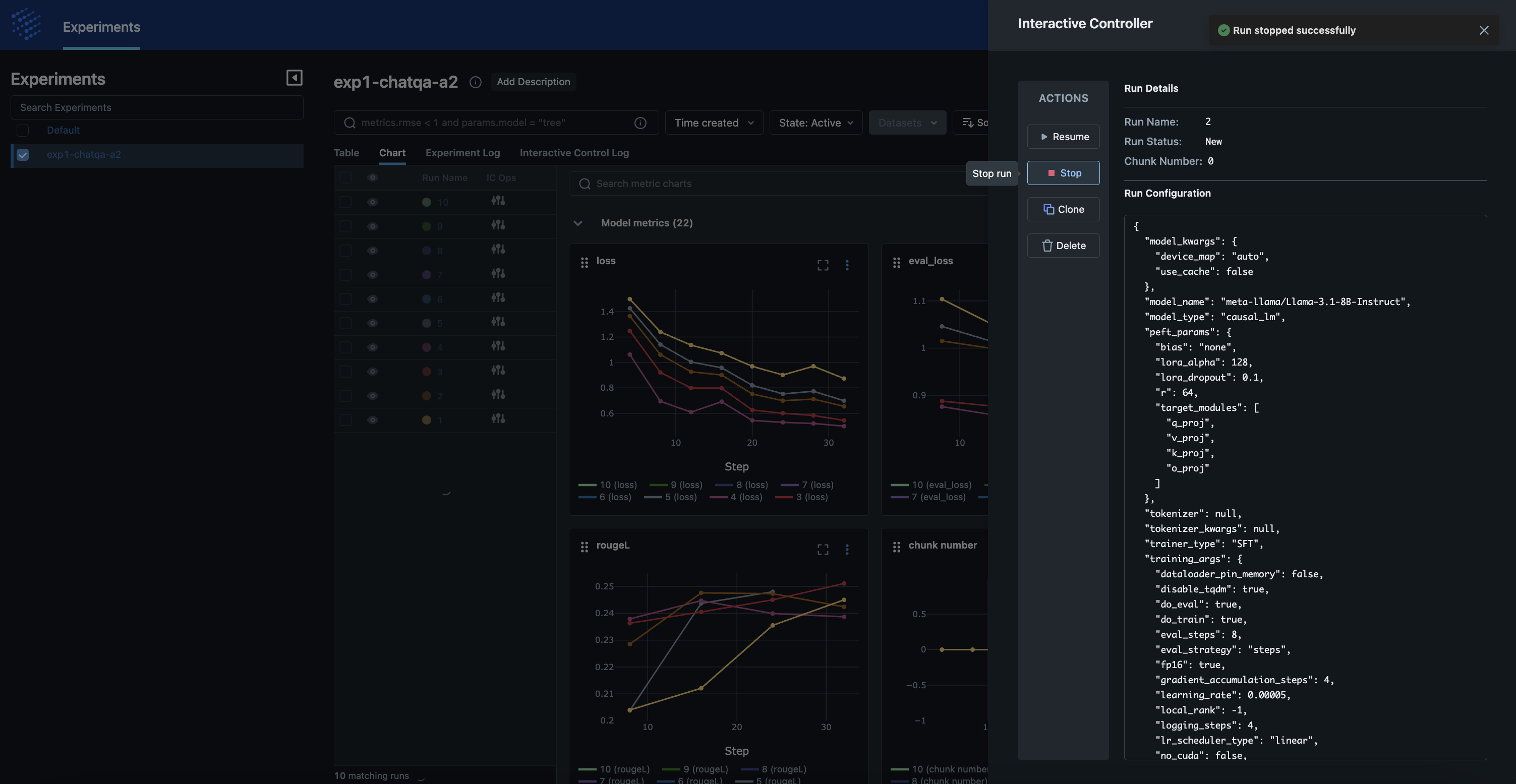
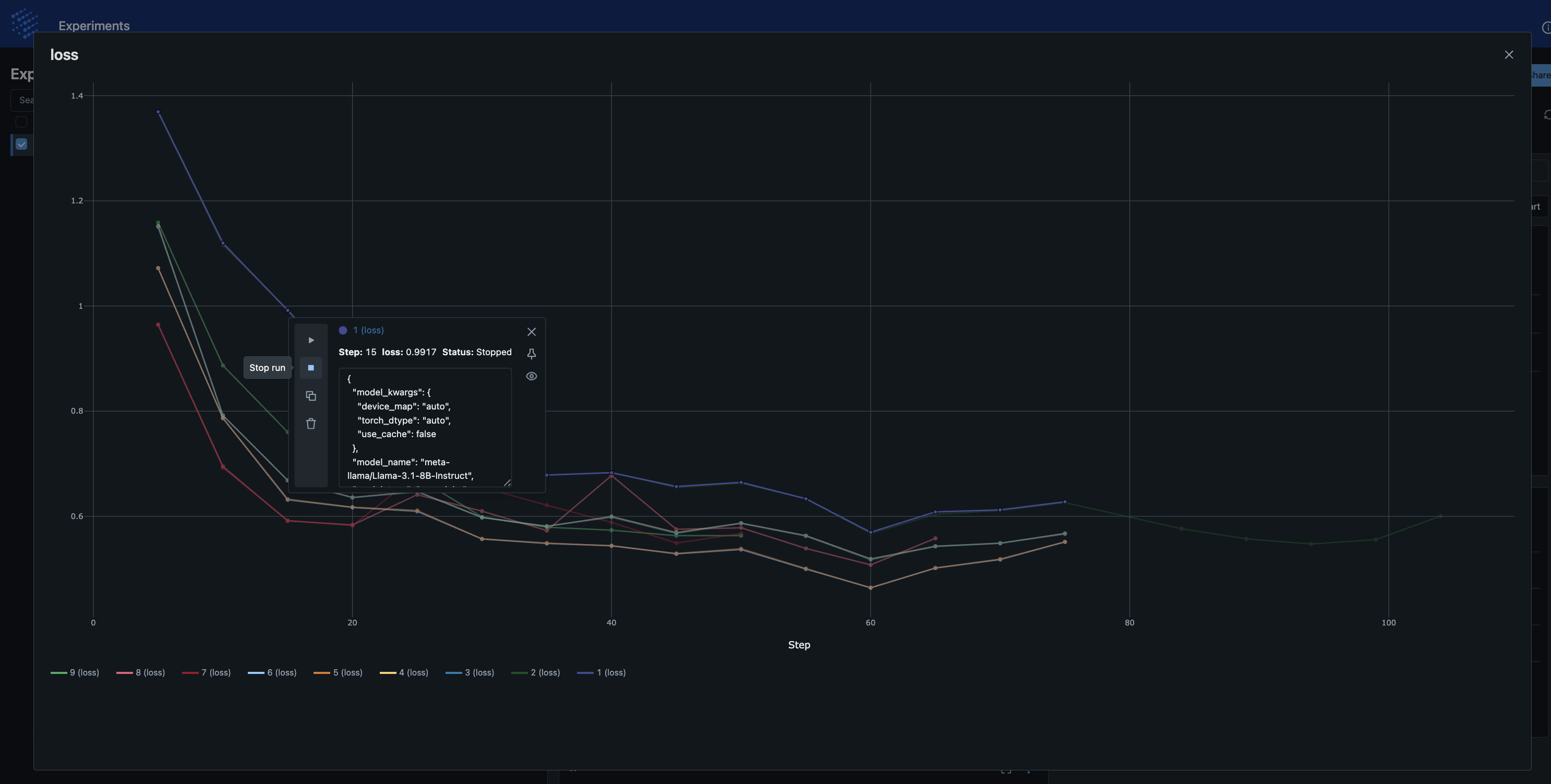
Note
The first screenshot is an older capture, so its Run Details panel reads “Chunk Number” and its
progress chart reads “chunk number.” On current main these read “Shard Number” and
“shard number.”
Resume
This IC Op is applicable only to a previously stopped run. It earmarks this run to be resumed from the next shard onward, when it will be added to the mix of ongoing runs and assigned GPU(s) automatically. You cannot resume an already resumed or deleted run.
Clone-Modify
This is a powerful IC Op that is applicable to any ongoing, stopped, or resumed run.
It allows you to add “clones” of a chosen run, called the “parent” run, during a run_fit().
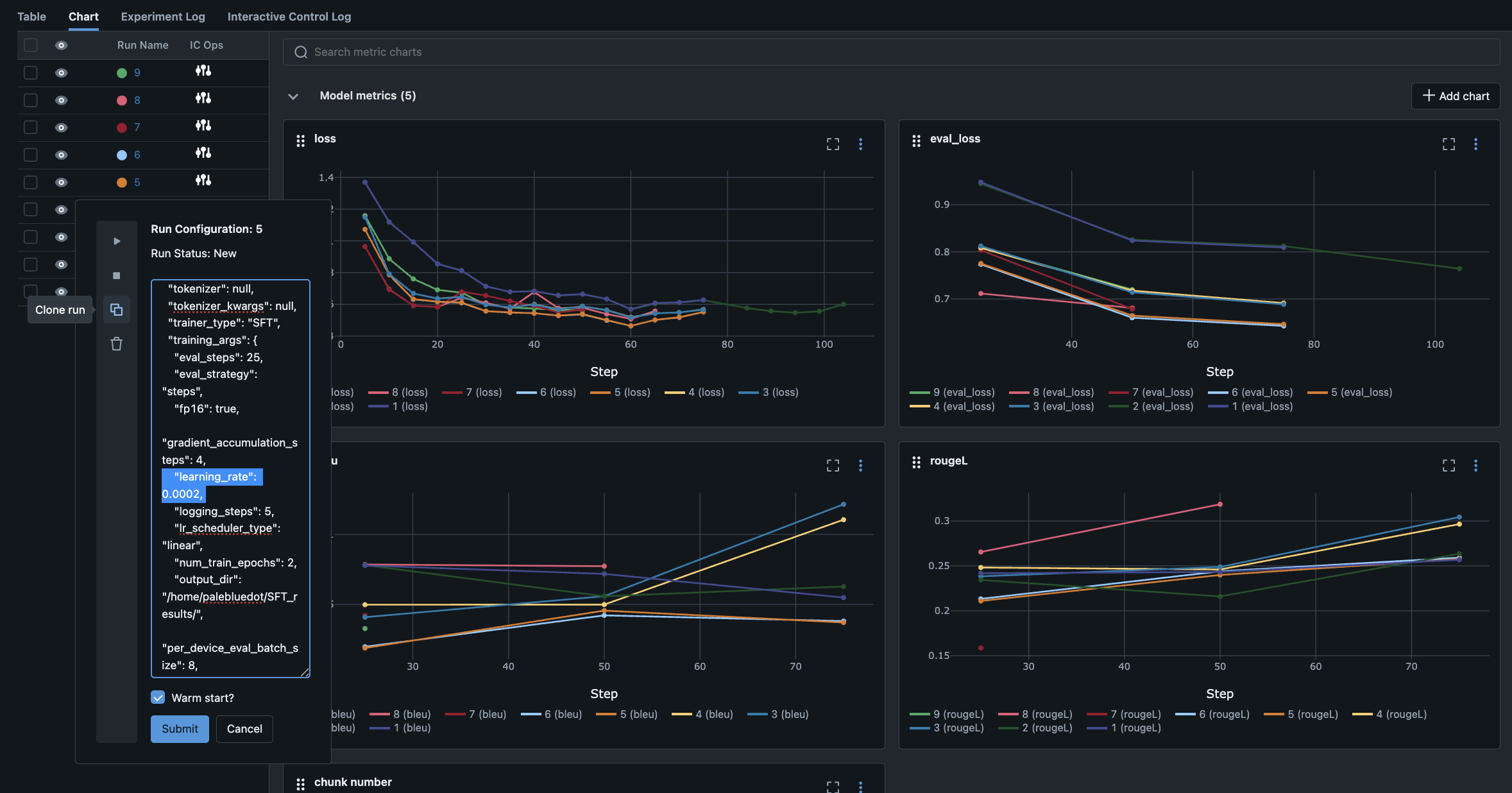
The IC Op panel displays an editable text box with the full knob config dictionary of the parent.
Edit any knobs, e.g., learning rate, LoRA rank, or even base model as if you are injecting
that new run config from code, except this is done conveniently from the metrics dashboard itself.
As of this writing, we only support providing a single config for this IC Op.
Soon we will support providing a config-group generator such as RFGridSearch() or
RFRandomSearch() as well in the IC Op panel itself akin to the launching code.
You can also warm-start a clone using its parent’s weights if you’d like. Warm-started clones inherit their parent’s learning behavior so far and thus, they can reach better eval metrics faster. Note that warm starting is only allowed if the clones have identical neural architecture as the parent, including LoRA adapters; otherwise, it will error out.
When you are ready with your clone’s config, click “Submit” to execute this IC Op.
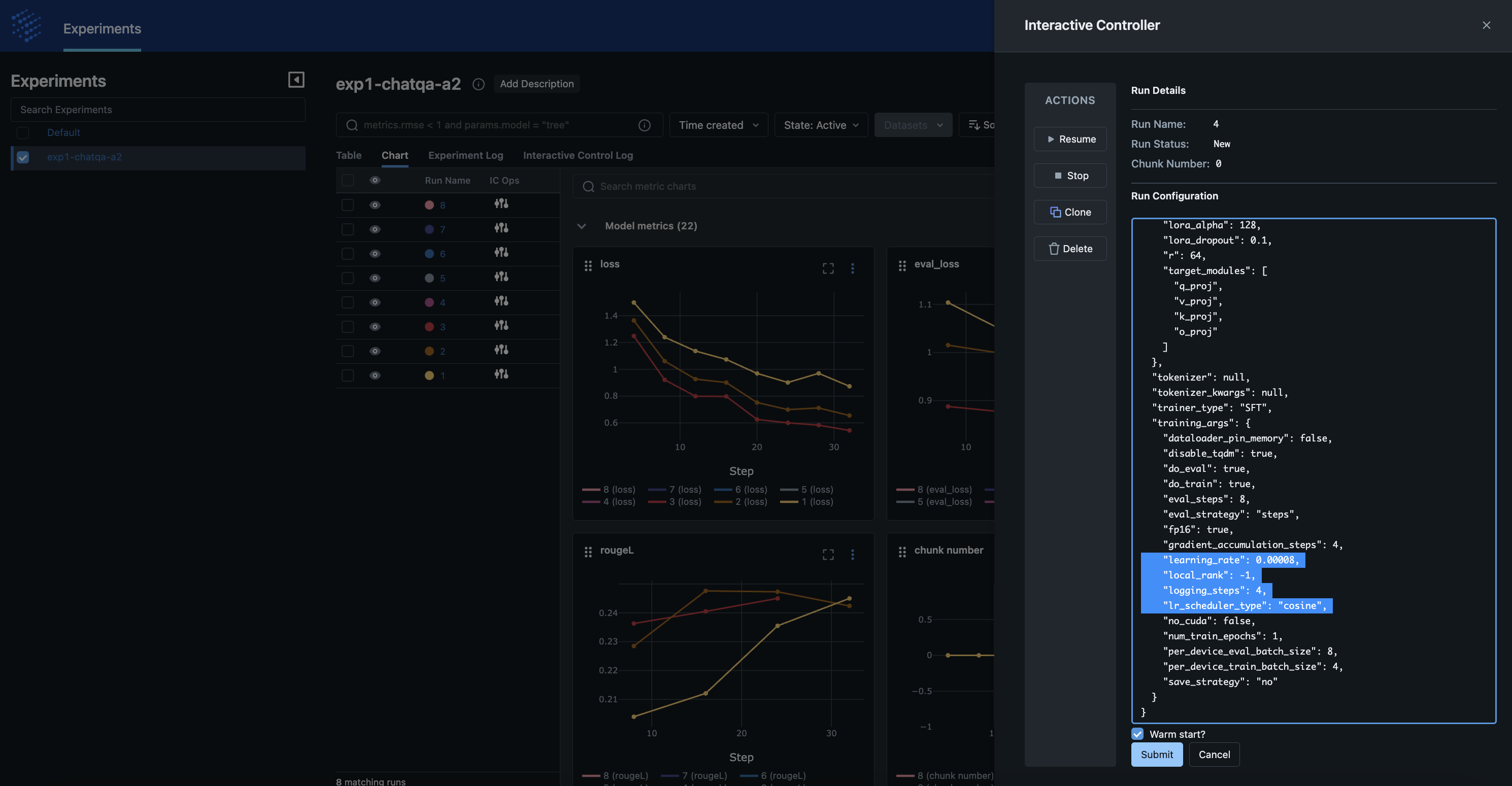
Note
Both screenshots are older captures. The Run Details panel in the first reads “Chunk Number,” and
the progress chart in both reads “chunk number.” On current main these read “Shard Number”
and “shard number.”
Clones will automatically appear on the plots from the next shard onward; just refresh the page. RapidFire AI’s adaptive scheduler automatically reapportions GPUs across all runs, including clones. So, do not need to worry about manually splitting GPUs across models, juggling new processes, etc. Clones are treated just like any other run; so, you can clone that clone later with IC Ops again.
You can submit multiple Clone-Modify ops on the same run or different runs whenever you want. They will get queued up and all clones will start together at the next shard boundary.
Clone-Modify combined with Stop enables you to amplify how many configs you can explore for your AI use case, dataset, models, and eval metrics to dramatically cut down the time to reach much better eval metrics even within a single experiment.
Which Knobs Can Be Modified
Clone-Modify lets you edit any knob in the parent’s config before submitting, but not every edit produces a valid run. For training, warm-start in particular imposes additional hard constraints.
RapidFire AI does not currently block these edits at submission time; invalid edits cause the run to fail when the model, LoRA adapter, or retrieval index is loaded, or produces a run that is not comparable to its parent. The guidance below describes what produces a valid run; treat it as correctness requirements rather than enforced guardrails.
Note
A few prerequisites apply to all Clone-Modify ops:
You cannot clone a deleted run.
The warm-start option during clone-modify applies only to
run_fit(), notrun_evals().For a warm-start clone in
run_fit(), the clone must have an identical neural architecture to the parent (see below), or it will error out when the parent checkpoint/adapter is loaded.A warm-start clone inherits the parent’s resource estimate, so changing resource knobs such as
num_gpuson a warm clone may be overridden.If the parent has not visited any shards yet, a warm-start clone behaves like a cold clone and starts from the beginning.
For run_evals() clones (warm start inapplicable)
As of this writing, only Query Processing knobs can be modified via IC Ops. The Document Preprocessing knobs are fixed during execution because the vector store / retrieval context is already built and shared with the parent; changing them would require rebuilding the index. We intend to support this extension in due course.
Editable Query Processing Knobs:
search_cfgreranker_cfg; note thatkinsearch_cfgmust remain greater than or equal totop_ninreranker_cfg; otherwise that combination is invalid and is omitted.The generator / model config (see caveats below)
prompt_manager(few-shot): editable. Its example selection uses its ownembedding_cfgover the examples pool, which is separate from the document-sideembedding_cfgthat builds the vector store; editing it re-embeds only the examples, not the document corpus.preprocess_fnandpostprocess_fn
Generator Knob Caveats:
API generator (
RFAPIModelConfig): Editingendpoint_configre-provisions the gateway endpoint eagerly at construction, so an invalid key or unreachable MLflow server fails immediately. A reused endpoint name must keep the sameapi_key_name. Rate-limit knobs must follow thetpmvs (itpm+otpm) rule.vLLM generator (
RFvLLMModelConfig): The model id must be a valid Hugging Face repo that can be downloaded, and the swapped-in model must fit the actor’s GPU memory. Sampling params must be valid for the new model, e.g.,max_tokensinsampling_paramswithin its context window (note that this knob is namedmax_completion_tokensonly for the API generator’smodel_config).
For run_fit() clones without warm start (cold clones)
A cold clone starts a fresh run from scratch, so almost any knob can change as long as the resulting config is valid and self-consistent:
The base model id must be downloadable, and the chosen
dtype/ quantization must be supported by the model and the GPU.For LoRA, the
target_modulesmust be valid module names for the chosen architecture, andrankmust be a positive integer.For DPO, the data must be preference-formatted and a valid reference model provided.
For GRPO, valid reward function(s) must be provided.
Clone-Modify edits the config for the same kind of training run. It cannot change the training algorithm, viz., SFT vs. DPO vs. GRPO.
For run_fit() clones with warm start (warm clones)
A warm clone continues from the parent’s weights/checkpoint, so any knob that changes the model’s weight tensors or their shapes is not allowed and will error out when the parent checkpoint/adapter is loaded.
Editable Knobs that Preserve Neural Architecture:
Optimization knobs:
learning_rate, LR scheduler / warmup, weight decay, optimizer betas/eps, gradient accumulation, batch size, additional epochs/steps, andmax_grad_norm.LoRA non-structural knobs:
lora_alphaandlora_dropout.Recipe hyperparameters: DPO
beta; GRPOnum_generations, reward weighting, and KL coefficient.
NOT Editable — Changes Neural Architecture (warm start will error out):
Model architecture: base model,
dtype, quantization (e.g., 4-bit / 8-bit), attention implementation, and any RoPE / max-position scaling that alters the model.Tokenizer or chat-template changes that alter the vocabulary or special tokens.
LoRA structural knobs:
rank(r) andtarget_modules.
Delete
This IC Op earmarks the run to be deleted from the next shard onward. On the chart, you will see its curves vanish almost immediately. You cannot do any further IC Ops on a deleted run because it will not be visible. Note that although a deleted run vanishes from the plots, its model checkpoints are still part of the artifacts of that experiment so that you have post-hoc auditability.
Coming Soon: Templated Automation of IC Ops
IC Ops are a powerful capability to dramatically improve the effectiveness of your experiments. We plan to add automated template support for IC Ops based on feedback. This will help you apply a consistent policy for using stop, clone-modify, etc. across your projects and/or personnel via code. You can also create new customized semi-automated heuristics on top of IC Ops or schedule them for automated future execution instead of having to sit in the loop.
Please do let us know on Discord if you have other requests regarrding how you’d like to use IC Ops!