API: LangChain RAG Spec
RapidFire AI’s core API for defining the stages of a retrieval augmentation pipeline before the generator is a wrapper around the corresponding APIs of LangChain. In particular, this class specifies all of the following stages: data loading, chunking, embedding, indexing, retrieval, and reranking steps. Note that many of these stages are optional.
Many of the arguments (knobs) here can also be List valued or Range valued depending
on its data type, as explained below. All this forms the base set of knob combinations from which
a config group can be produced. Also read the Multi-Config Specification page.
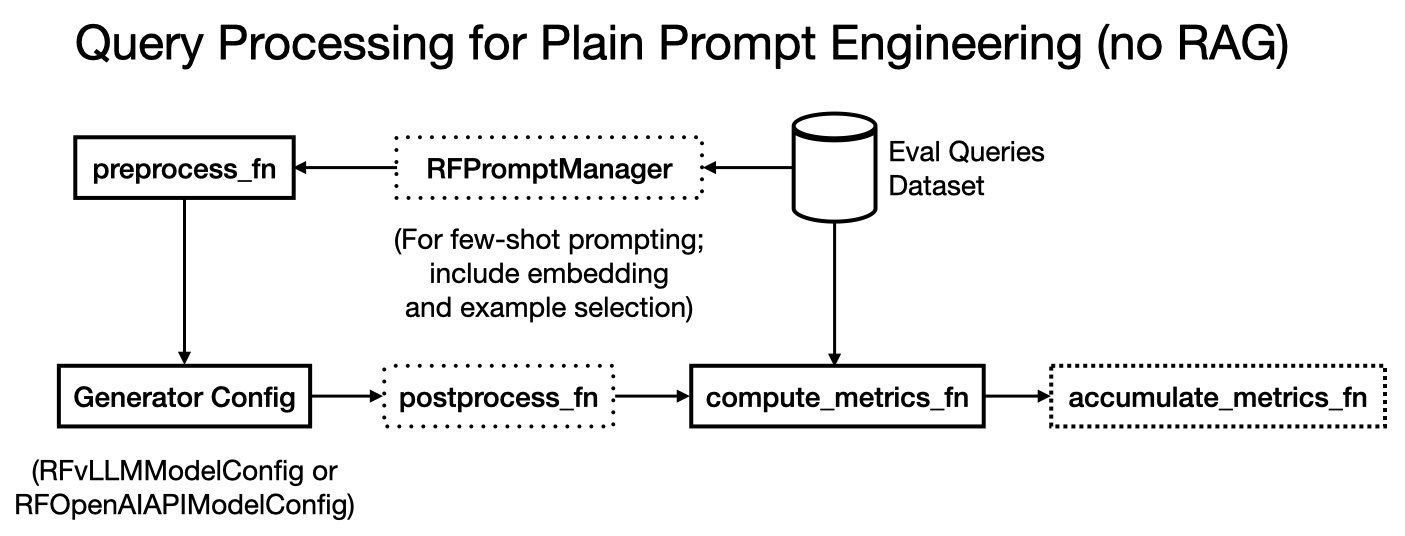
Note that for plain prompt/context engineering use cases without RAG, you can skip providing this entire class. If you’d like to do few-shot prompting instead, also read API: Prompt Manager and Other Eval Config Knobs page. Here is an illustration of the non-RAG prompt engineering workflow, with optional few-shot prompting.
RapidFire AI’s execution pipeline for RAG pipelines engineering is split into 2 main stages as illustrated in the figure below:
Document Preprocessing: Workers operate in parallel on the base data and produce preprocessed data that is stored in a vector store.
Query Processing: Workers operate in parallel on the eval set examples to embed them, retrieve relevant chunks from the vector store, rerank them, construct the full context, and then generate the outputs.
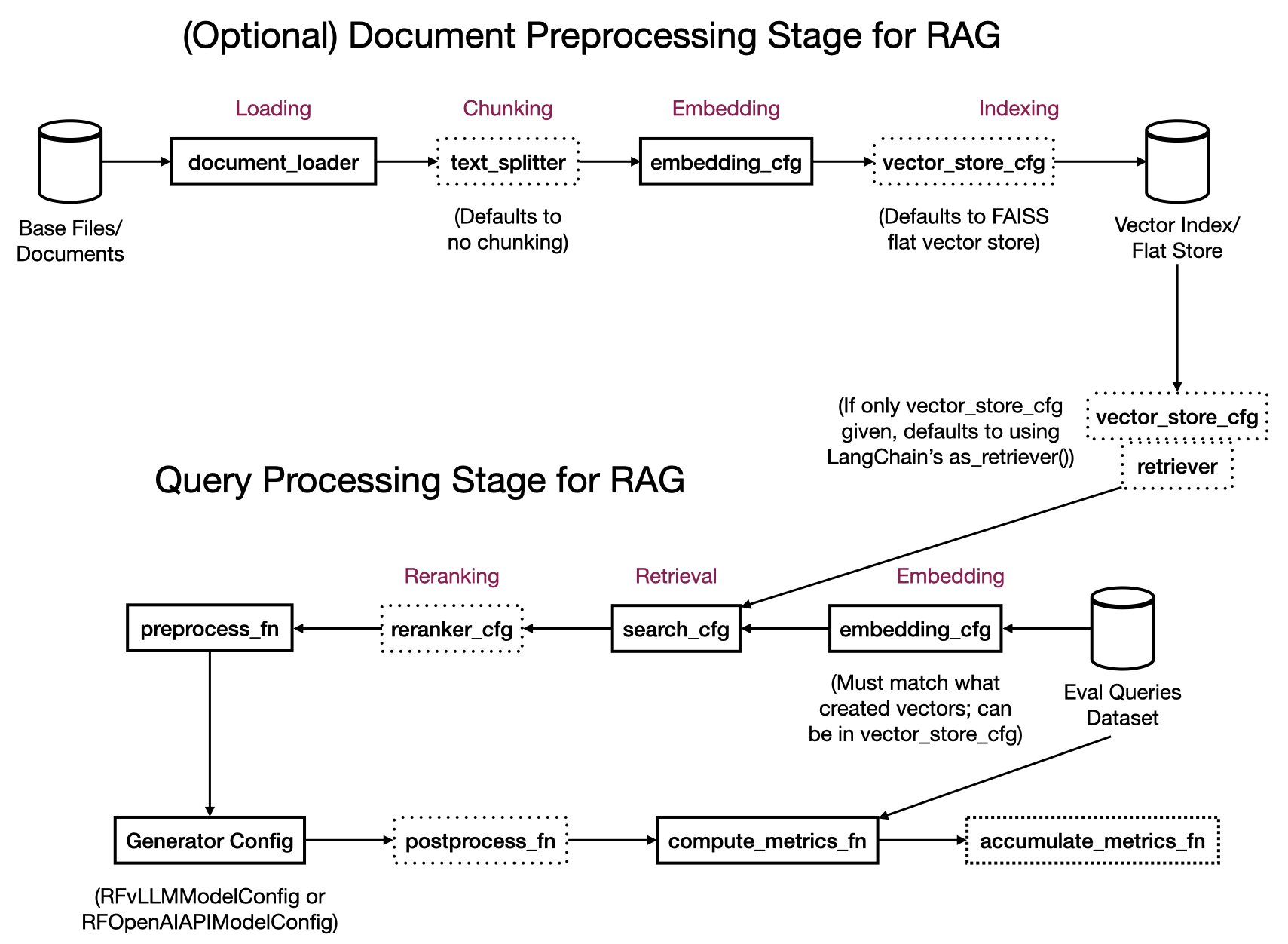
Depending on the state of your use case’s data, you can invoke only the Query Processing stage or both stages in one go via the same RFLangChainRagSpec depending on what arguments are provided:
With Preprocessing: This creates both Document Preprocessing workers and Query Processing workers. Provide
document_loader, optionaltext_splitter,embedding_cfg, and optionalvector_store_cfg. The document preprocessing workers operate on the base data. For multimodal data, they optionally summarize per-modality text/image/table elements into chunkable content if amultimodal_processoris provided and offload the original artifacts perartifact_storage_cfg. Then they produce chunks iftext_splitteris provided, embed the chunks (or the whole documents iftext_splitteris skipped), and store them in the vector store. Ifvector_store_cfgis not provided, RapidFire AI defaults to creating a FAISS vector store for you, whose index type depends onenable_gpu_search: an approximate HNSW index on CPU or an exact flat L2 index on GPU.Without Preprocessing: This creates only Query Processing workers that operate the optionally provided preprocessed vector store. Provide optional
embedding_cfgto apply to the queries (same as what produced the vector store), an optionalretrieverand/orvector_store_cfg, an optionalsearch_cfg, and an optionalreranker_cfg. Note that for plain context engineering use cases without RAG, there is no embedding, retrieval, or reranking; for few-shot prompting without RAG, you can provideembedding_cfgand similarity search knobs for the examples.
See also
In a Clone-Modify IC Op for run_evals(), only Query Processing knobs below
(e.g., search_cfg, reranker_cfg, generator, prompt_manager)
can be edited in flight; the Document Preprocessing knobs are fixed. See
which knobs can be modified on the IC Ops page.
- class RFLangChainRagSpec
- __init__(document_loader: BaseLoader | list[BaseLoader] = None, multimodal_processor: dict[str, Any] = None, text_splitter: TextSplitter = None, embedding_cfg: dict[str, Any] = None, vector_store_cfg: dict[str, Any] = None, retriever: BaseRetriever = None, search_cfg: dict[str, Any] = None, reranker_cfg: dict[str, Any] = None, artifact_storage_cfg: dict[str, Any] | bool = None, enable_gpu_search: bool = False, document_template: Callable[[Document], str] = None)
Initialize the RAG specification with document loading, chunking, embedding, indexing, retrieval, and reranking configurations.
- Parameters:
document_loader (BaseLoader | list[BaseLoader], optional) – The loader(s) for source documents from various sources (files, directories, databases, etc.). May be a single LangChain
BaseLoader, or a list ofBaseLoaderinstances (withNoneentries allowed and skipped) whose loaded documents are concatenated; a single loader is normalized to a one-element list internally. Required only when neitherretrievernorvector_store_cfgis provided.multimodal_processor (dict[str, Any], optional) – Optional config for per-modality (text/image/table) summarization of documents loaded via an Unstructured-style loader. See the Multimodal RAG and Artifact Storage section below for the full structure and an example. If not provided, no multimodal summarization is performed.
text_splitter (TextSplitter, optional) – The text splitter for chunking documents for RAG purposes. Controls chunk size, overlap, and splitting strategy. Must be a LangChain TextSplitter.
embedding_cfg (dict[str, Any], optional) – The embedding class and its kwargs to convert a chunk/query into a vector, provided as a single dictionary. Must include a key
"class"with the class itself as value, not an instance. Options for the class includeHuggingFaceEmbeddingsandOpenAIEmbeddings. The kwargs that follow must contain all parameters needed to initialize the embedding class; required parameters vary by embedding class. For example,HuggingFaceEmbeddingsneedsmodel_nameandmodel_kwargs(which is wheredevicegoes, e.g.,{"device": "cuda:0"}), plus an optionalencode_kwargs, whileOpenAIEmbeddingsneeds"model"and"api_key".vector_store_cfg (dict[str, Any], optional) –
The vector store type and args to store and possibly index embedding vectors for retrieval, provided as a single dictionary.
"type": The type of vector store to use. Must be one of"faiss","pgvector", or"pinecone". Required."batch_size": Number of vectors per insert batch. Applies to all 3 types of stores. Optional; default is 128.
The remaining keys are type-specific args as listed below. The vector store operates in one of 3 modes depending on the rest of the RAG spec:
Create mode: When
document_loaderis provided and no pre-existing index/collection names are specified, a new vector store is created and populated from the loaded documents.Read mode: When
document_loaderis absent and pre-existing index/collection names are specified, the vector store is opened in read-only mode for retrieval against the existing index.Update mode: When both
document_loaderand pre-existing index/collection names are provided, the existing index/collection is updated with the new documents added to it.
Supported vector store types and their arg keys:
FAISS: No additional keys. Uses an approximate HNSW index on CPU (
IndexHNSWFlat) by default. Setenable_gpu_search=Trueon the constructor to use GPU-accelerated FAISS with an exact flat L2 index (IndexFlatL2) instead. Only supports Create mode since it’s an in-memory store that is not persistent. So, the notion of pre-existing indexes does not apply.Pinecone:
"pinecone_api_key": Pinecone API key. Optional if thePINECONE_API_KEYenvironment variable is set."index_namespace": A 2-tuple of strings (tuple[str, str]) with index name and namespace. Required for Read/Update mode and must be a pre-existing index and namespace (NB: namespace can be empty string""in Pinecone). N/A for Create mode."spec": AServerlessSpecorPodSpecinstance specifying the Pinecone deployment (e.g., cloud and region). Required for Create mode. N/A for Read/Update mode."metric": Distance metric for the index, must be one of"cosine","euclidean", or"dotproduct". Optional for Create mode; default is"cosine". N/A for Read/Update mode."embedding_cfg": Embedding config dict (same format as the top-levelembedding_cfg). Required for any mode either here or in the top-level config for any mode. If provided here, this takes precedence over the top-level embedding config. For Create mode, we recommend providing it in the top-level config unless you want to couple different embedding configs with different vector stores."text_key": The metadata field name used to store the original raw text content associated with a vector in Pinecone. Optional; default is"text". Applicable to all modes. This is useful when the Pinecone index was populated by an external tool that stored text under a non-default metadata field name (e.g.,"content","original_text")."vector_type": Vector type for the index. Accepts aVectorTypevalue or string. Optional for Create mode; default is"dense". N/A for Read/Update mode."tags": Arbitrary string key-value tags to attach to the index. Optional for Create mode; default isNone. N/A for Read/Update mode."timeout": Timeout in seconds for index operations. Optional for Create mode; default isNone. N/A for Read/Update mode."deletion_protection": Whether deletion protection is enabled. Accepts aDeletionProtectionvalue or string. Optional for Create mode; default is"disabled". N/A for Read/Update mode.
To recap, for all 3 modes
"pinecone_api_key"is needed either here or as an environment variable;embedding_cfgis also required either here or in the top-level config. The"text_key"is optional for all modes and defaults to"text".For Create mode,
"spec"is required but the following are all optional:"metric","vector_type","tags","timeout", and"deletion_protection". Although the argument"index_namespace"is inapplicable, internally RapidFire AI creates an index name automatically with prefix “rf-” and an SHA hash per pre-processing worker to avoid naming conflicts; the namespace created is the default empty string.For Read/Update mode,
"index_namespace"is required and must point to a pre-existing index and namespace. All the other arguments are inapplicable.Postgres PGVector:
"connection": DB connection string or engine. Required for all modes."collection_name": A pre-existing PGVector collection/table name to use for retrieval. Required for Read/Update mode. Inapplicable to Create mode; an SHA-based random name will be generated."embedding_cfg": Same explanation as above under Pinecone."pre_delete_collection": IfTrue, deletes the collection if it already exists before writing. Use with caution. Optional; default isFalse. Applicable only to Update mode.
The store is built from the documents provided via
document_loader. If this entire config is skipped, a default FAISS vector store will be created automatically, with its index type set byenable_gpu_searchas described below.retriever (BaseRetriever, optional) – The retriever for chunk retrieval. If not provided, a default FAISS vector store will be created automatically using the specified search configuration below, again with its index type set by
enable_gpu_search. Must be a LangChain BaseRetriever implementation.search_cfg (dict, optional) –
The search algorithm type and its kwargs to use for retrieval of vectors/chunks, provided as a single dictionary. Must include a key
"type"with one of the following three options listed as value; default is"similarity"."similarity": Standard cosine similarity search."similarity_score_threshold": Similarity search with minimum score threshold (SST)."mmr": Maximum Marginal Relevance (MMR) search for diversity.
Additional parameters for search configuration depend on the type; the keys can include the following:
"k": Number of documents to retrieve. Default is 5."filter": Optional filter criteria function for search results."score_threshold": Only for SST. Minimum similarity score threshold."fetch_k": Only for MMR. Number of documents to fetch before MMR reranking. Default is 20."lambda_mult": Only for MMR. Diversity parameter for MMR balancing relevance vs. diversity. Default is 0.5.
reranker_cfg (dict[str, Any], optional) – The reranker class and its kwargs for reordering retrieved chunks by relevance, provided as a single dictionary. Must include a key
"class"with the class itself as value, not an instance. Options includeCrossEncoderRerankerfromlangchain.retrievers.document_compressors. The instantiated reranker is applied to each query’s results individually. The kwargs that follow must contain all parameters needed to initialize the reranker class; required parameters vary by reranker class. For example,CrossEncoderRerankerneedsmodel_name,model_kwargsandtop_n.artifact_storage_cfg (dict[str, Any] | bool, optional) – Optional config controlling whether and where large per-document artifacts (raw text bodies, base64 images, table HTML) are offloaded out of the vector-store record. Accepts
None(default; offload to local disk underRF_HOME/artifacts),False(drop the raw artifacts after summarization, keeping only the summary), or a dict withbackend("s3","gcs", or"local") andbucket(plus optionalprefix). See the Multimodal RAG and Artifact Storage section below for details.enable_gpu_search (bool, optional) – If
True, uses GPU-accelerated FAISS (IndexFlatL2 on GPU) with matrix multiply for exact search. Otherwise uses CPU-based FAISS HNSW index (IndexHNSWFlat) for approximate search. GPU mode requiresfaiss-gpupackage and CUDA-compatible GPU. Default isFalse.document_template (Callable[[Document], str], optional) –
Optional function to format each retrieved chunk for context injection into prompts. Should accept a single LangChain
Documentobject and return a formatted string. Multiple documents are separated by double newlines when serialized. If not provided, the following default template is used:def default_template(doc: Document) -> str: """Default document formatting template.""" metadata = "; ".join([f"{k}: {v}" for k, v in doc.metadata.items()]) return f"{metadata}:\n{doc.page_content}"
You can provide a custom template to control what metadata fields are included and how the content is formatted. For example, to include only a specific metadata field:
def sample_template(doc: Document) -> str:
    doc_source = doc.metadata.get("source", "")
    return f"Document Source: {doc_source}:\nContent: {doc.page_content}"
Or for a dataset like SciFact where documents have a
"title"metadata field ingested viametadata_funcin the document loader:def custom_template(doc: Document) -> str: return f"{doc.metadata['title']}: {doc.page_content}"
- serialize_documents(batch_docs: list[list[Document]]) list[str]
Serialize batch of context document chunks into formatted strings for context injection.
- get_context(batch_queries: list[str], use_reranker: bool = True, serialize: bool = True) list[str] | list[list[Document]]
Convenience function to retrieve and optionally also serialize relevant context document chunks for batch queries. By default, if a reranker is provided in the RAG spec it will be applied.
- Parameters:
batch_queries (list[str]) – List of query strings to retrieve context for.
use_reranker (bool, optional) – Whether to apply reranking if a reranker is provided. Default is True. Set to False to skip reranking.
serialize (bool, optional) – Whether to serialize documents into strings. If False, returns raw Document objects. Default is True.
- Returns:
List of formatted context strings (if :code:`serialize`=True) or list of Document lists (if :code:`serialize`=False), one per query.
- Return type:
- Raises:
ValueError – If retriever is not configured in RAG spec; internal method
build_index()will fail.
Examples:
# From the FiQA tutorial notebook
rag_gpu = RFLangChainRagSpec(
document_loader=DirectoryLoader(
path=str(dataset_dir / "fiqa"),
glob="corpus.jsonl",
loader_cls=JSONLoader,
loader_kwargs={
"jq_schema": ".",
"content_key": "text",
"metadata_func": lambda record, metadata: {
"corpus_id": int(record.get("_id"))
}, # store the document id
"json_lines": True,
"text_content": False,
},
sample_seed=42,
),
# 2 chunking strategies with different chunk sizes
text_splitter=List([
RecursiveCharacterTextSplitter.from_tiktoken_encoder(
encoding_name="gpt2", chunk_size=64, chunk_overlap=32
),
RecursiveCharacterTextSplitter.from_tiktoken_encoder(
encoding_name="gpt2", chunk_size=256, chunk_overlap=32
)
]),
embedding_cfg={
"class": HuggingFaceEmbeddings,
"model_name": "sentence-transformers/all-MiniLM-L6-v2",
"model_kwargs": {"device": "cuda:0"},
"encode_kwargs": {"normalize_embeddings": True, "batch_size": batch_size},
},
# FAISS is an in-memory store and only works in create mode.
vector_store_cfg={"type": "faiss"},
search_cfg={
"type": "similarity",
"k": 8
},
# 2 reranking strategies with different top-n values
reranker_cfg={
"class": CrossEncoderReranker,
"model_name": "cross-encoder/ms-marco-MiniLM-L6-v2",
"model_kwargs": {"device": "cpu"},
"top_n": List([2, 5]),
},
enable_gpu_search=True, # GPU-based exact search instead of ANN index
)
# From the SciFact tutorial notebook: custom metadata ingestion and document template
# The metadata_func in the JSONLoader controls what metadata fields are extracted from
# each source record and attached to the LangChain Document object. These fields are then
# available in doc.metadata for use in document_template, preprocess_fn, postprocess_fn, etc.
def metadata_func(record: dict, metadata: dict) -> dict:
"""Extract custom metadata fields from each source JSON record."""
metadata["corpus_id"] = int(record.get("_id"))
metadata["title"] = record.get("title", "")
return metadata
# The document_template controls how each retrieved chunk is formatted into a string
# when serialized for context injection into the prompt. Here we prepend the title.
def custom_template(doc: Document) -> str:
    return f"{doc.metadata['title']}: {doc.page_content}"
rag_cpu = RFLangChainRagSpec(
document_loader=DirectoryLoader(
path="datasets/scifact/",
glob="corpus.jsonl",
loader_cls=JSONLoader,
loader_kwargs={
"jq_schema": ".",
"content_key": "text",
"metadata_func": metadata_func, # Custom metadata extraction
"json_lines": True,
"text_content": False,
},
sample_seed=42,
),
...
vector_store_cfg={"type": "faiss"},
search_cfg={"type": "similarity", "k": 10},
reranker_cfg={
...
},
document_template=custom_template, # Custom formatting using ingested metadata
)
# Based on the FiQA Pinecone tutorial notebook
spec = ServerlessSpec(cloud="gcp", region="us-central1")

# Create mode
vector_store_cfg_create={
    "type": "pinecone",
    "pinecone_api_key": PINECONE_API_KEY, # Or set the PINECONE_API_KEY environment variable
    "spec": spec,
    "metric": "cosine",
    "batch_size": 1024, # documents are embedded in batches of 1024. Defaults to 128.
}

# Read and Update mode
vector_store_cfg_read_update={
    "type": "pinecone", # Required
    "pinecone_api_key": PINECONE_API_KEY, # Or set the PINECONE_API_KEY environment variable
    "index_namespace": List([("fiqa", "chunk64"), ("fiqa", "chunk256")]), # Names of *pre-existing* pinecone indexes paired with respective namespaces
    "embedding_cfg": {
        "class": HuggingFaceEmbeddings,
        "model_name": "sentence-transformers/all-MiniLM-L6-v2",
        "model_kwargs": {"device": "cuda:0"},
        "encode_kwargs": {"normalize_embeddings": True, "batch_size": 128}
    },
    "text_key": "original_doctext", # Metadata field name for raw text in Pinecone; defaults to "text"
}

rag_gpu = RFLangChainRagSpec(
    document_loader=DirectoryLoader(
        ...
    ),
    ...
    vector_store_cfg=vector_store_cfg_create,  # Using Pinecone in create mode
)
# Based on the FiQA PGVector tutorial notebook
connection = "postgresql+psycopg://rapidfireai:rapidfireai@localhost:6024/rapidfireai"

# Create mode:
vector_store_cfg_create={
    "type": "pgvector",
    "connection": connection,
    "batch_size": 1024, # Different from generation batch size. Defaults to 128 if not set
}

# Read and Update mode shown for illustrative purposes:
vector_store_cfg_read_update={
    "type": "pgvector",
    "connection": connection,
    "collection_name": List(["fiqa_chunk64", "fiqa_chunk256"]), # Names of *pre-existing* pgvector collections to use for retrieval
    "embedding_cfg": {
        "class": HuggingFaceEmbeddings,
        "model_name": "sentence-transformers/all-MiniLM-L6-v2",
        "model_kwargs": {"device": "cuda:0"},
        "encode_kwargs": {"normalize_embeddings": True, "batch_size": 128}
    },
    "pre_delete_collection": True, # Optional. Deletes the collection if already exists. Use with caution!
}

rag_gpu = RFLangChainRagSpec(
    document_loader=DirectoryLoader(
        ...
    ),
    ...
    vector_store_cfg=vector_store_cfg_create,  # Using PGVector in create mode
)
Notes:
Note that one RFLangChainRagSpec object has a single document_loader slot to specify the base data, and that slot may hold either one loader or a list of loaders (whose documents are concatenated).
You can specify a List or Range (when applicable) for all the other knobs in a multi-config specification.
For instance, the example above showcases two text splitters and two rerankers with different hyperparameters.
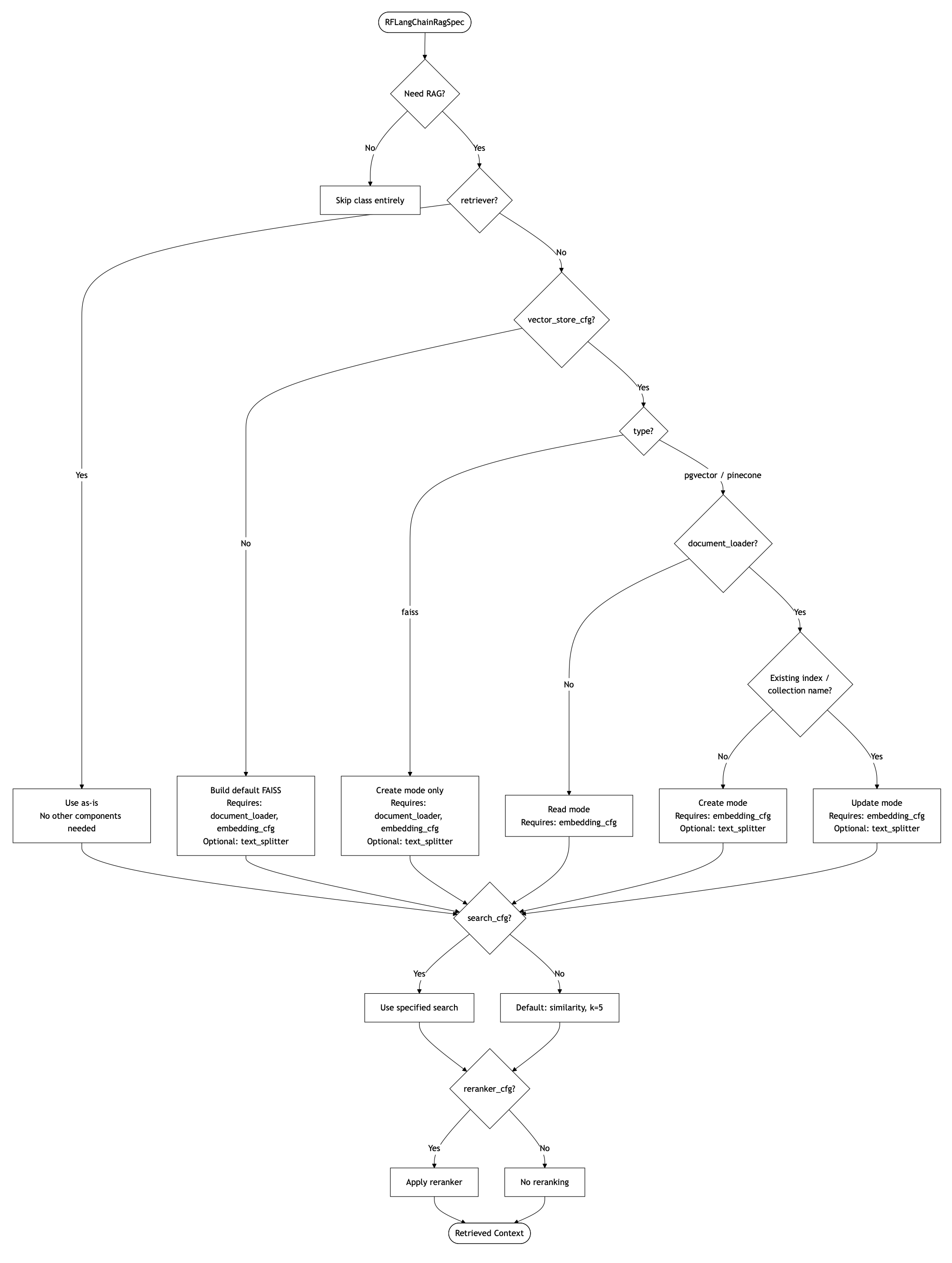
Overall, to recap the control flow of the components are as follows:
If
retrieveris provided, it is used as is. No need fordocument_loader,text_splitter, orvector_store_cfg.If no retriever but a
vector_store_cfgis provided, a retriever is created from that vector store via LangChain’sas_retriever()method and used. Theembedding_cfgis still required to embed eval queries when RAG is used; it must match the embedding model used to build the vector store for RAG. No need fordocument_loaderortext_splitterin this case for Read mode. Butdocument_loaderis required in Update mode, whiletext_splitteris optional.If neither retriever nor vector store is provided but preprocessing is needed, a default FAISS vector store (and retriever) is built from documents. In this case
document_loaderis required. Buttext_splitteris still optional: you may embed whole documents without chunking if you omit this.If
search_cfgis provided, it is used; otherwise there is a default as listed above.If
reranker_cfgis provided, it is used; otherwise no reranking is applied.If no RAG is needed and only plain prompt/context engineering is being explored, skip this class altogether. If you want to do few-shot prompting on top, check out API: Prompt Manager and Other Eval Config Knobs page.
Note
When constructing a config group with List() or Range(), the interaction of k in search_cfg with top_n in reranker_cfg has a nuance. If the assigned k is less than the assigned top_n, the combination is meaningless and will be omitted automatically by RapidFire AI. All other combinations will create valid runs. For example, if k is List([5, 10])() and top_n is List([5, 6])(), then in the 2 x 2 grid obtained, the combination k = 5 and top_n = 6 will be automatically omitted but the other 3 will be valid.
Finally, here is a comprehensive flowchart explaining the control flow of all the components and arguments in the RAG spec based on what you need for your use case.
Multimodal RAG and Artifact Storage
For document collections that mix prose, tables, and figures (e.g., PDFs), RFLangChainRagSpec can
summarize each element with an LLM at ingestion time and offload the original artifacts to a storage backend.
This is controlled by two constructor knobs: multimodal_processor (what to summarize and with which model)
and artifact_storage_cfg (whether and where to keep the originals). It works best with an
Unstructured-style document_loader that emits typed elements; document_loader may also be a list
of loaders to ingest multiple sources in one run.
At ingestion, each loaded element is categorized by modality (text, image, or table). For each modality that has
a configured summarizer, the element is summarized by the given generator LLM and the summary becomes the chunk’s
page_content (i.e., what gets embedded and retrieved), while the original artifact is offloaded per
artifact_storage_cfg. RapidFire AI automatically adds these fields to each document’s metadata:
document_type: The detected modality, one of"text","image", or"table".rf_doc_id: A unique RapidFire-generated identifier for the document.text_source/image_source/table_source: The storage URI (or local path) of the original artifact for that modality. These are absent whenartifact_storage_cfg=False.
Multimodal Processor
multimodal_processor is a dict with up to three keys, one per modality. Omit a modality to skip
summarizing it; if the whole config is None, no multimodal summarization is performed.
"text_summarizer_cfg": Summarizer for text elements."image_summarizer_cfg": Summarizer for image elements (requires a vision-capable generator)."table_summarizer_cfg": Summarizer for table elements.
Each maps to a sub-dict with:
"instructions": A string prompt describing how to summarize the artifact."generator": A generator config instance —RFAPIModelConfigorRFvLLMModelConfig— used to produce the summary. Also read the API: Generator Configs page.
Artifact Storage
artifact_storage_cfg controls whether the original (pre-summary) artifacts are kept and where. It accepts
one of three forms:
None(default): Offload artifacts to local disk underRF_HOME/artifacts/.... The in-metadata*_sourcefield is set to that path. Works out of the box with no cloud bucket or extra installs.False: Do not store originals. The raw*_sourceartifacts are dropped after summarization, so the summary inpage_contentis the only surviving copy. This keeps vector-store metadata small (useful for stores like Pinecone), but the originals are unrecoverable, so use only when you don’t need them downstream.A
dict: Explicit control with the following keys."backend": One of"s3","gcs", or"local". Required."bucket": A cloud bucket name for"s3"/"gcs", or a base directory path for"local". Required."prefix": Top-level key/path prefix for stored objects. Optional; default is"artifacts".
The
"s3"and"gcs"backends require the corresponding cloud SDK and credentials (resolved via the SDK’s default credential chain).
At query time, when offloading is enabled (i.e., artifact_storage_cfg is not False), the original
artifacts can be fetched inside your preprocess_fn via rag.storage_client, which exposes:
get_text(uri): Return the stored text body.get_image_base64(uri): Return the stored image as a base64 string.get_html(uri): Return the stored table HTML.read_bytes(uri): Return the raw stored bytes.to_https_url(uri): Convert ans3:///gs://URI to its HTTPS form; a pure URL transformation — the object must already permit public reads to be fetchable. Available on thes3andgcsbackends only; not onlocal.
Pass the matching *_source metadata value as the uri. Note that rag.storage_client is
None when artifact_storage_cfg=False.
Example:
# Based on the MMDocIR multimodal tutorial notebook (rf-tutorial-MMDocIR)

# One shared, vision-capable summarizer LLM used for all three modalities.
# Pinning rate limits keeps the scheduler from over-saturating the upstream API.
summarizer_config = RFAPIModelConfig(
    client_config={"max_retries": 2},
    endpoint_config={
        "provider": "openai",
        "api_key_name": "my_openai_key",
        "api_key": OPENAI_API_KEY,
        "endpoint": {"model": "gpt-5.4-nano", "name": "openai-mm-summarizer", "usage_tracking": True},
    },
    model_config={"max_completion_tokens": 8192},
    rpm_limit=30_000,
    tpm_limit=180_000_000,
    rag=None,            # not used: this client only summarizes
    prompt_manager=None,
)

# Route each modality to a summarizer. Omit a key to skip that modality.
multimodal_processor = {
    "text_summarizer_cfg":  {"instructions": text_or_table_instructions, "generator": summarizer_config},
    "image_summarizer_cfg": {"instructions": image_instructions,         "generator": summarizer_config},
    "table_summarizer_cfg": {"instructions": text_or_table_instructions, "generator": summarizer_config},
}

# Artifact storage: None = local disk (default); False = drop originals;
# or a dict for explicit s3/gcs/local control.
artifact_storage_cfg = None
# artifact_storage_cfg = False
# artifact_storage_cfg = {"backend": "gcs", "bucket": "my-bucket", "prefix": "mm-rag/artifacts"}

rag_cpu = RFLangChainRagSpec(
    document_loader=[document_loader],          # an Unstructured-style loader (or a list of loaders)
    multimodal_processor=multimodal_processor,
    text_splitter=text_splitter,
    vector_store_cfg=vector_store_cfg,
    search_cfg=search_cfg,
    reranker_cfg=reranker_cfg,
    artifact_storage_cfg=artifact_storage_cfg,
)
# In your preprocess_fn, fetch the original artifacts via rag.storage_client
def sample_preprocess_fn(batch, rag, prompt_manager):
    all_context = rag.get_context(batch_queries=batch["query"], serialize=False)
    for docs in all_context:
        for doc in docs:
            doc_type = doc.metadata["document_type"]        # "text" | "image" | "table" (auto-added)
            # doc.page_content holds the LLM-generated summary in all cases
            if rag.storage_client is not None:              # None when artifact_storage_cfg=False
                if doc_type == "image" and doc.metadata.get("image_source"):
                    b64 = rag.storage_client.get_image_base64(doc.metadata["image_source"])
                elif doc_type == "table" and doc.metadata.get("table_source"):
                    html = rag.storage_client.get_html(doc.metadata["table_source"])
                elif doc.metadata.get("text_source"):
                    text = rag.storage_client.get_text(doc.metadata["text_source"])
    ...